Reference files and example code
Resources for connecting your own sensors and microcontrollers. Both files work with the RIGEL-WEB browser app and with the original RIGEL Windows application (written in GameMaker version 6 GML).
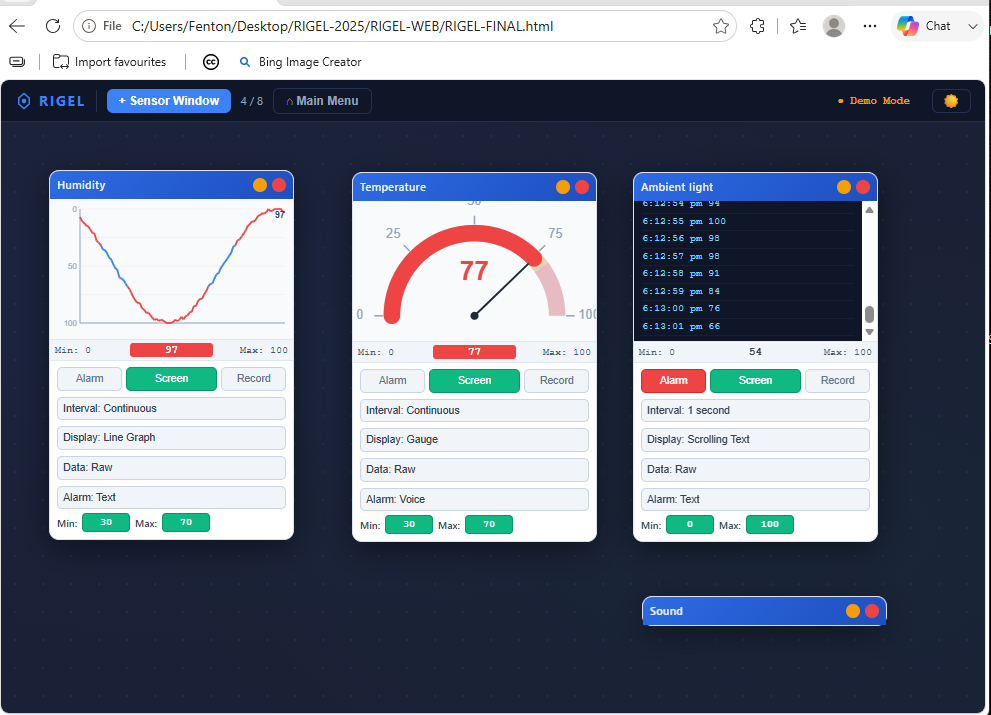
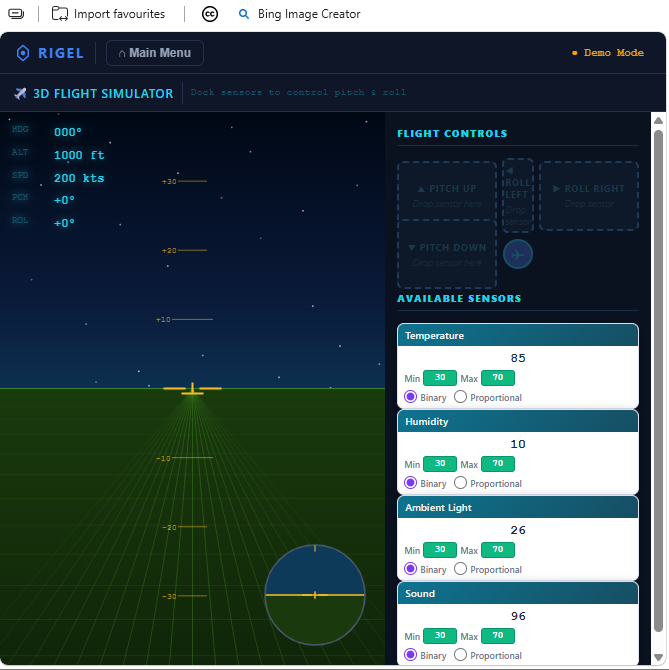
A free, self-contained, single-file HTML application of roughly 5,100 lines that recreates the original Windows RIGEL in a web browser. It connects low-cost do-it-yourself sensors, wearable biomedical sensors, and microcontrollers to real-time data logging, life-function monitoring, and game control. It is cross-platform and installation-free, with no server, no framework, and no network dependency.
Real science from almost nothing. Laboratory-quality measurement built from no-cost or ultra low-cost materials, putting hands-on investigation within reach of junior learners and resource-limited classrooms, not only senior or well-funded ones.
Resources for connecting your own sensors and microcontrollers. Both files work with the RIGEL-WEB browser app and with the original RIGEL Windows application (written in GameMaker version 6 GML).
RIGEL began as a Windows application. Both RIGEL and RIGEL-WEB connect a computer or tablet to microcontroller-based sensor units, including the Picaxe 08M2 and 14M2, Arduino, ESP8266, ESP32, and the BBC Micro:bit, over USB-serial, Bluetooth, or WiFi. RIGEL-WEB logs and graphs sensor data live in the browser, all from a single local HTML file that runs offline once opened.
Data a learner gathers directly from a real sensor has a transparent provenance. As AI-generated datasets, drawn from models trained on an increasingly polluted literature, become harder to trust, first-hand measurement of this kind matters more, not less. And because RIGEL-WEB is free and works with sensors costing a few dollars, the old cost-and-access defence of simulation no longer applies: with the equipment barrier removed, simulation must be justified on other grounds.
Warning: DO NOT let students test boiling water or live electrical outlets!
There is no need to calibrate temperature sensors using boiling water. Where in the real world would a student expect to record that temperature? For some reason teachers default to using ice and boiling water to calibrate sensors. If you are investigating cooling curves, YOU should safely get sensor readings at 100 °C and PROVIDE THIS to learners.
Always remind learners that scientists work carefully and safely, no matter what they see in movies or TV!
RIGEL began as a Windows application built by repurposing game design software into a universal science instrument. RIGEL-WEB carries that whole idea into a single browser file. Its sister application, SMART, uses the browser audio subsystem for fast acoustic timing, while RIGEL-WEB focuses on many-channel sensor work through a microcontroller. Together they form a zero-cost, cross-platform laboratory instrument suite that uses hardware schools already own.
The USB-serial connection uses the Web Serial API, currently supported in Chromium-based browsers such as Chrome and Edge. For the widest device reach, including Chromebooks and Safari-only iPad deployments, the sister tool SMART uses the broadly supported audio path instead.
RIGEL-WEB continues a consistent method across three decades: identify a structural property of an existing tool, use it for a purpose its designers did not intend, and document the result. It is a continuation of the question that founded the Nexus Research Group in 1997: how do you do authentic science with nothing? The approach is described further on the Design by Subversion page.
Archived on Zenodo with a permanent DOI: https://doi.org/10.5281/zenodo.20541487